Parallels RAS
OverviewVue d'ensembleÜberblickResumenVisão geralPanoramicaסקירה כללית
Parallels RAS (Remote Application Server) is a virtual application and desktop delivery platform. It allows users to access Windows applications and full desktops published on a Parallels RAS server, directly from a thin client managed by Xcalibur Global.
- Supports AD / SSO authentication — single sign-on using Active Directory credentials already entered at session login.
- Optional domain specification for multi-domain environments.
- Launch a specific application or desktop directly (optional) via the Advanced tab.
- Configurable gateway with SSL support for secure WAN access.
- Fullscreen mode for an immersive desktop experience.
Parallels RAS (Remote Application Server) est une plateforme de virtualisation d'applications et de bureaux Windows. Elle permet aux utilisateurs d'accéder aux applications Windows et aux bureaux complets publiés sur un serveur Parallels RAS, directement depuis un client léger géré par Xcalibur Global.
- Supporte l'authentification AD / SSO — connexion unique utilisant les identifiants Active Directory saisis à la session.
- Spécification de domaine optionnelle pour les environnements multi-domaines.
- Lancez directement une application ou un bureau spécifique (optionnel) via l'onglet Advanced.
- Passerelle configurable avec support SSL pour un accès sécurisé depuis le WAN.
- Mode plein écran pour une expérience bureau immersive.
Parallels RAS ist eine Plattform zur Bereitstellung virtueller Windows-Anwendungen und Desktops. Unterstützt AD/SSO-Authentifizierung, optionale Domainangabe, direkten Anwendungsstart, konfigurierbares Gateway mit SSL und Vollbildmodus.
Parallels RAS es una plataforma de entrega de aplicaciones y escritorios Windows virtualizados. Admite autenticación AD/SSO, especificación de dominio opcional, lanzamiento directo de aplicaciones, gateway configurable con SSL y modo de pantalla completa.
Parallels RAS é uma plataforma de entrega de aplicações e desktops Windows virtualizados. Suporta autenticação AD/SSO, especificação de domínio opcional, lançamento direto de aplicações, gateway configurável com SSL e modo ecrã inteiro.
Parallels RAS è una piattaforma per la distribuzione di applicazioni e desktop Windows virtualizzati. Supporta autenticazione AD/SSO, specificazione dominio opzionale, avvio diretto di applicazioni, gateway configurabile con SSL e modalità schermo intero.
Parallels RAS הוא פלטפורמה להפצת אפליקציות ושולחנות עבודה של Windows. תומך באימות AD/SSO, ציון דומיין אופציונלי, הפעלת אפליקציה ישירה, gateway מוגדר עם SSL ומצב מסך מלא.
Tab — BasicOnglet — BasicReiter — BasicPestaña — BasicSeparador — BasicScheda — Basicלשונית — Basic
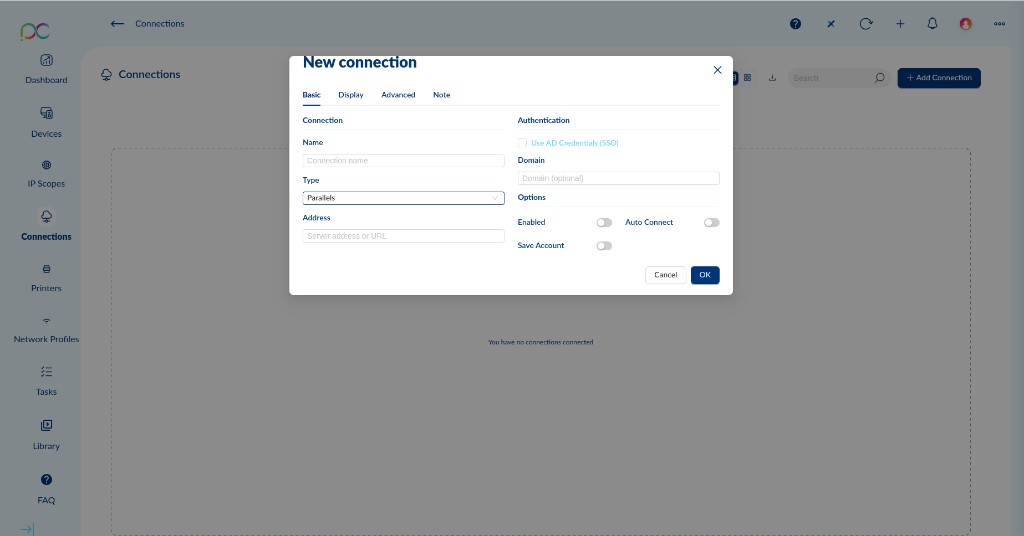
Connection
Connexion
Verbindung
Conexión
Ligação
Connessione
חיבור
| Field | Champ | Feld | Campo | Campo | Campo | שדה | Description | Description | Beschreibung | Descripción | Descrição | Descrizione | תיאור |
|---|---|---|---|---|---|---|---|---|---|---|---|---|---|
| Name | Display name for this Parallels RAS connection (e.g. "HQ Desktop", "Sales App Portal")Nom d'affichage de cette connexion Parallels RAS (ex. "Bureau HQ", "Portail Applications Ventes")Anzeigename der Parallels RAS-VerbindungNombre para mostrar (p. ej. "Escritorio Central", "Portal Ventas")Nome de exibição (ex. "Desktop HQ", "Portal Aplicações Vendas")Nome visualizzato (es. "Desktop Sede", "Portale App Vendite")שם תצוגה (לדוגמה "Desktop HQ", "פורטל אפליקציות") | ||||||||||||
| Type | Protocol selector — set to ParallelsSélecteur de protocole — réglé sur ParallelsProtokollauswahl — auf Parallels eingestelltSelector de protocolo — establecido en ParallelsSeletor de protocolo — definido como ParallelsSelettore protocollo — impostato su Parallelsבורר פרוטוקול — מוגדר ל-Parallels | ||||||||||||
| Address | IP address or hostname of the Parallels RAS server (e.g. ras.company.com, 192.168.10.50)Adresse IP ou nom d'hôte du serveur Parallels RAS (ex. ras.company.com, 192.168.10.50)IP-Adresse oder Hostname des Parallels RAS-ServersDirección IP o nombre de host del servidor Parallels RASEndereço IP ou nome do host do servidor Parallels RASIndirizzo IP o hostname del server Parallels RASכתובת IP או שם מארח של שרת Parallels RAS |
Authentication
Authentification
Authentifizierung
Autenticación
Autenticação
Autenticazione
אימות
| Option | Option | Option | Opción | Opção | Opzione | אפשרות | Description | Description | Beschreibung | Descripción | Descrição | Descrizione | תיאור |
|---|---|---|---|---|---|---|---|---|---|---|---|---|---|
| Use AD Credentials (SSO) | When checked, Parallels RAS automatically uses the Active Directory credentials entered at the device login. The user is authenticated transparently without being prompted again — ideal for corporate environments with AD infrastructure. When unchecked, Parallels will prompt for credentials at connection time. Lorsque coché, Parallels RAS utilise automatiquement les identifiants Active Directory saisis à la connexion de l'appareil. L'utilisateur est authentifié de manière transparente sans nouvelle demande — idéal pour les environnements d'entreprise avec infrastructure AD. Lorsque décoché, Parallels demandera les identifiants à la connexion. Wenn aktiviert, verwendet Parallels RAS automatisch die bei der Geräteanmeldung eingegebenen Active Directory-Anmeldedaten. Ideal für Unternehmensumgebungen mit AD-Infrastruktur. Bei Deaktivierung werden beim Verbindungsaufbau Anmeldedaten abgefragt. Cuando está marcado, Parallels RAS usa automáticamente las credenciales de Active Directory introducidas en el inicio de sesión del dispositivo. Ideal para entornos corporativos con infraestructura AD. Quando marcado, o Parallels RAS usa automaticamente as credenciais Active Directory introduzidas no login do dispositivo. Ideal para ambientes corporativos com infraestrutura AD. Se selezionato, Parallels RAS usa automaticamente le credenziali Active Directory inserite al login del dispositivo. Ideale per ambienti aziendali con infrastruttura AD. כאשר מסומן, Parallels RAS משתמש אוטומטית בפרטי Active Directory שהוזנו בהתחברות למכשיר. אידיאלי לסביבות ארגוניות עם תשתית AD. | ||||||||||||
| Domain | Active Directory domain name (optional). Specify when the RAS server serves multiple AD domains and you need to target a specific one (e.g. CORP, company.local). Leave blank to use the default domain.Nom de domaine Active Directory (optionnel). Spécifier lorsque le serveur RAS dessert plusieurs domaines AD et que vous devez en cibler un spécifique (ex. CORP, company.local). Laisser vide pour utiliser le domaine par défaut.Active Directory-Domainname (optional). Angeben wenn der RAS-Server mehrere AD-Domains bedient. Leer lassen für Standard-Domain.Nombre de dominio Active Directory (opcional). Especificar cuando el servidor RAS sirve múltiples dominios AD. Dejar en blanco para el dominio predeterminado.Nome de domínio Active Directory (opcional). Especificar quando o servidor RAS serve múltiplos domínios AD. Deixar em branco para o domínio padrão.Nome dominio Active Directory (opzionale). Specificare quando il server RAS serve più domini AD. Lasciare vuoto per il dominio predefinito.שם דומיין Active Directory (אופציונלי). ציין כאשר שרת RAS משרת מספר דומיינים. השאר ריק לדומיין ברירת המחדל. |
Options
Options
Optionen
Opciones
Opções
Opzioni
אפשרויות
| Option | Option | Option | Opción | Opção | Opzione | אפשרות | Description | Description | Beschreibung | Descripción | DescriçãoDescrizione | תיאור |
|---|---|---|---|---|---|---|---|---|---|---|---|---|
| Enabled | Toggle to enable/disable this connection.Activer/désactiver cette connexion.Verbindung aktivieren/deaktivieren.Habilitar/deshabilitar esta conexión.Ativar/desativar esta ligação.Attivare/disattivare questa connessione.הפעל/השבת חיבור זה. | |||||||||||
| Auto Connect | Automatically launches this Parallels RAS session when the device boots or the user logs in.Lance automatiquement cette session Parallels RAS au démarrage ou à la connexion.Startet diese Parallels RAS-Sitzung automatisch beim Start oder Login.Inicia automáticamente esta sesión al arrancar o al iniciar sesión.Inicia automaticamente esta sessão ao arrancar ou ao iniciar sessão.Avvia automaticamente questa sessione all'avvio o al login.מפעיל אוטומטית את סשן Parallels RAS עם הפעלה או כניסה. | |||||||||||
| Save Account | Saves the account credentials locally on the thin client so that they are remembered between sessions. Useful when SSO is not enabled and the user always connects with the same account.Enregistre les identifiants du compte localement sur le client léger pour qu'ils soient mémorisés entre les sessions. Utile lorsque le SSO n'est pas activé et que l'utilisateur se connecte toujours avec le même compte.Speichert die Anmeldedaten lokal auf dem Thin Client für sitzungsübergreifende Verwendung. Nützlich wenn SSO nicht aktiviert ist.Guarda las credenciales localmente en el thin client para recordarlas entre sesiones. Útil cuando SSO no está habilitado.Guarda as credenciais localmente no thin client para as memorizar entre sessões. Útil quando o SSO não está ativado.Salva le credenziali localmente sul thin client per ricordarle tra le sessioni. Utile quando SSO non è abilitato.שומר את פרטי הכניסה באופן מקומי על הלקוח הדק כדי לזכור אותם בין סשנים. שימושי כאשר SSO אינו מופעל. |
Tab — DisplayOnglet — DisplayReiter — DisplayPestaña — DisplaySeparador — DisplayScheda — Displayלשונית — Display
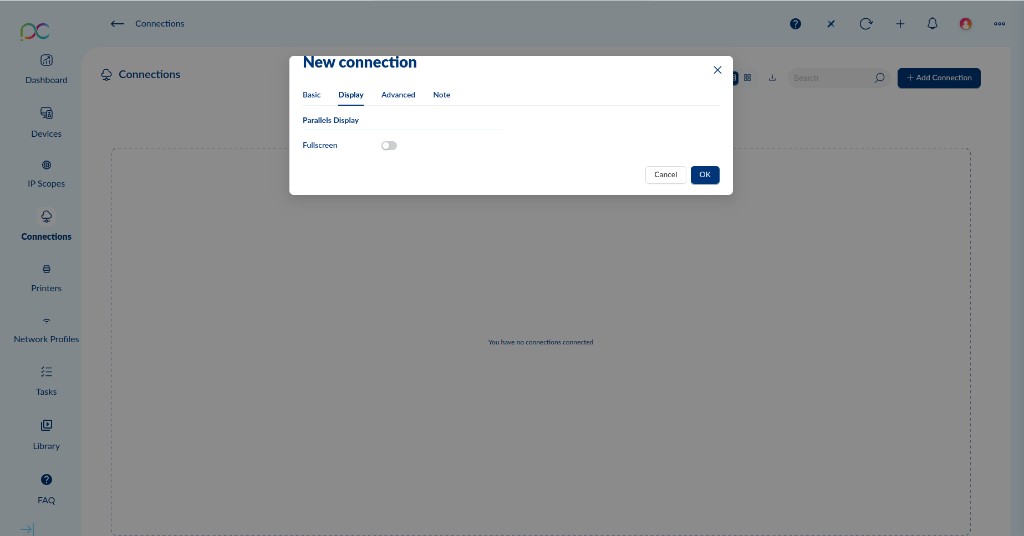
| Option | Option | Option | Opción | Opção | Opzione | אפשרות | Description | Description | Beschreibung | Descripción | Descrição | Descrizione | תיאור |
|---|---|---|---|---|---|---|---|---|---|---|---|---|---|
| Fullscreen | When enabled, the Parallels RAS session opens in full-screen mode, occupying the entire display. Recommended for desktop replacements and kiosk scenarios where users should only interact with the remote environment. When disabled, the session opens in a resizable window. Lorsque activé, la session Parallels RAS s'ouvre en mode plein écran, occupant tout l'affichage. Recommandé pour les remplacement de postes et scénarios kiosque où les utilisateurs ne doivent interagir qu'avec l'environnement distant. Lorsque désactivé, la session s'ouvre dans une fenêtre redimensionnable. Wenn aktiviert, öffnet sich die Parallels RAS-Sitzung im Vollbildmodus. Empfohlen für Desktop-Ersatz und Kiosk-Szenarien. Bei Deaktivierung öffnet sich die Sitzung in einem veränderbaren Fenster. Cuando está habilitado, la sesión de Parallels RAS se abre en modo de pantalla completa. Recomendado para reemplazo de escritorios y escenarios kiosco. Cuando está deshabilitado, la sesión se abre en una ventana redimensionable. Quando ativado, a sessão Parallels RAS abre em modo ecrã inteiro. Recomendado para substituição de desktops e cenários de quiosque. Quando desativado, a sessão abre numa janela redimensionável. Se abilitato, la sessione Parallels RAS si apre in modalità schermo intero. Consigliato per sostituzione desktop e scenari kiosk. Se disabilitato, la sessione si apre in una finestra ridimensionabile. כאשר מופעל, סשן Parallels RAS נפתח במצב מסך מלא. מומלץ להחלפת שולחן עבודה ותרחישי קיוסק. כאשר מושבת, הסשן נפתח בחלון בגודל משתנה. |
Tab — AdvancedOnglet — AdvancedReiter — AdvancedPestaña — AdvancedSeparador — AdvancedScheda — Advancedלשונית — Advanced
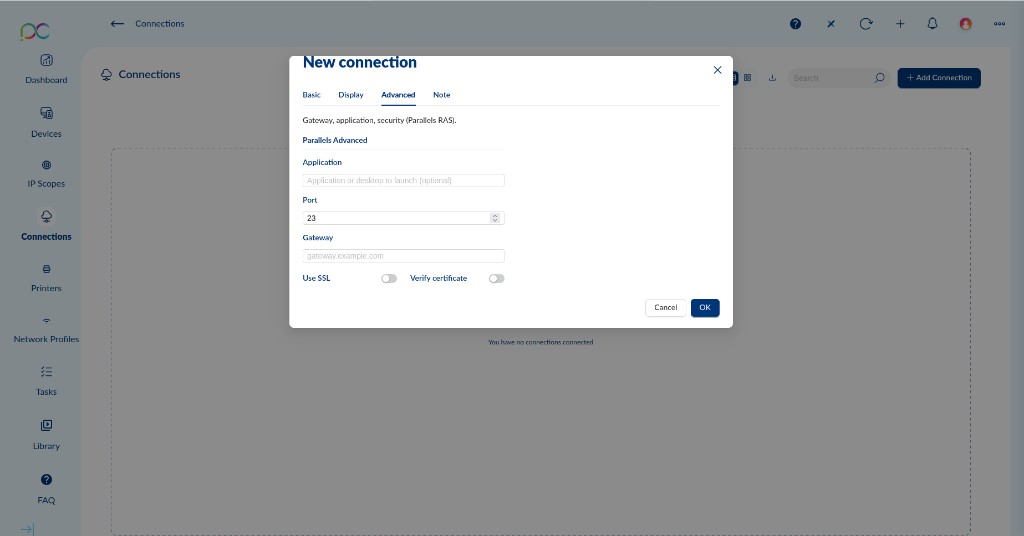
Note: The Advanced tab heading reads "Gateway, application, security (Parallels RAS)" — it groups settings for direct application targeting, port override, gateway configuration and SSL security.
Remarque : L'en-tête de l'onglet Advanced indique « Gateway, application, security (Parallels RAS) » — il regroupe les paramètres de ciblage d'application, remplacement de port, configuration de passerelle et sécurité SSL.
Hinweis: Der Advanced-Reiter fasst Einstellungen für Anwendungsstart, Port-Überschreibung, Gateway und SSL-Sicherheit zusammen.
Nota: La pestaña Advanced agrupa configuraciones de inicio de aplicación, anulación de puerto, gateway y seguridad SSL.
Nota: O separador Advanced agrupa definições de lançamento de aplicação, substituição de porta, gateway e segurança SSL.
Nota: La scheda Advanced raggruppa impostazioni per avvio applicazione, override porta, gateway e sicurezza SSL.
הערה: לשונית Advanced מקבצת הגדרות להפעלת אפליקציה, עקיפת יציאה, gateway ואבטחת SSL.
| Field / Option | Champ / Option | Feld / Option | Campo / Opción | Campo / Opção | Campo / Opzione | שדה / אפשרות | Description | Description | Beschreibung | Descripción | Descrição | Descrizione | תיאור |
|---|---|---|---|---|---|---|---|---|---|---|---|---|---|
| Application |
Name or path of a specific published application to launch directly when connecting (optional). If left blank, Parallels RAS opens the default desktop or application list published to this user. Example: Notepad, C:\Apps\ERP\erp.exe.
Nom ou chemin d'une application publiée spécifique à lancer directement lors de la connexion (optionnel). Si laissé vide, Parallels RAS ouvre le bureau par défaut ou la liste d'applications publiée à cet utilisateur. Exemple : Notepad, C:\Apps\ERP\erp.exe.
Name oder Pfad einer bestimmten veröffentlichten Anwendung zum direkten Start beim Verbinden (optional). Leer lassen für Standard-Desktop oder Anwendungsliste.
Nombre o ruta de una aplicación publicada específica a lanzar directamente al conectar (opcional). Si se deja en blanco, abre el escritorio predeterminado.
Nome ou caminho de uma aplicação publicada específica para lançar diretamente ao ligar (opcional). Se em branco, abre o desktop padrão.
Nome o percorso di un'applicazione pubblicata specifica da avviare direttamente alla connessione (opzionale). Se vuoto, apre il desktop predefinito.
שם או נתיב של אפליקציה מפורסמת ספציפית להפעלה ישירה בחיבור (אופציונלי). אם ריק, פותח את שולחן העבודה ברירת המחדל.
|
||||||||||||
| Port | TCP port used to connect to the Parallels RAS server. Default value shown is 23; the standard Parallels RAS client port is typically 80 (HTTP) or 443 (HTTPS/SSL). Adjust to match your Parallels RAS infrastructure configuration.Port TCP utilisé pour se connecter au serveur Parallels RAS. La valeur par défaut affichée est 23 ; le port client Parallels RAS standard est généralement 80 (HTTP) ou 443 (HTTPS/SSL). Ajuster selon la configuration de votre infrastructure Parallels RAS.TCP-Port für die Verbindung zum Parallels RAS-Server. Standard-Parallels RAS-Ports: 80 (HTTP) oder 443 (HTTPS/SSL). Entsprechend der Infrastrukturkonfiguration anpassen.Puerto TCP para conectar al servidor Parallels RAS. Los puertos estándar de Parallels RAS son 80 (HTTP) o 443 (HTTPS/SSL). Ajustar según la configuración de la infraestructura.Porta TCP para ligar ao servidor Parallels RAS. Portas padrão do Parallels RAS: 80 (HTTP) ou 443 (HTTPS/SSL). Ajustar conforme a configuração da infraestrutura.Porta TCP per connettersi al server Parallels RAS. Porte standard Parallels RAS: 80 (HTTP) o 443 (HTTPS/SSL). Adattare alla configurazione dell'infrastruttura.יציאת TCP לחיבור לשרת Parallels RAS. יציאות Parallels RAS סטנדרטיות: 80 (HTTP) או 443 (HTTPS/SSL). התאם לפי תצורת התשתית. | ||||||||||||
| Gateway | Address of the Parallels RAS Secure Client Gateway (optional). Use when the RAS server is behind a firewall and external clients connect via a dedicated gateway (e.g. gateway.company.com). Leave blank for direct LAN connections.Adresse de la passerelle client sécurisée Parallels RAS (optionnel). Utiliser lorsque le serveur RAS est derrière un pare-feu et que les clients externes se connectent via une passerelle dédiée (ex. gateway.company.com). Laisser vide pour les connexions LAN directes.Adresse des Parallels RAS Secure Client Gateways (optional). Verwenden wenn der RAS-Server hinter einer Firewall liegt und externe Clients über ein dediziertes Gateway verbinden. Leer lassen für direkte LAN-Verbindungen.Dirección del Parallels RAS Secure Client Gateway (opcional). Usar cuando el servidor RAS está detrás de un firewall y los clientes externos se conectan a través de un gateway dedicado. Dejar en blanco para conexiones LAN directas.Endereço do Parallels RAS Secure Client Gateway (opcional). Usar quando o servidor RAS está atrás de uma firewall e clientes externos se ligam via gateway dedicado. Deixar em branco para ligações LAN diretas.Indirizzo del Parallels RAS Secure Client Gateway (opzionale). Usare quando il server RAS è dietro un firewall e i client esterni si connettono tramite un gateway dedicato. Lasciare vuoto per connessioni LAN dirette.כתובת Parallels RAS Secure Client Gateway (אופציונלי). השתמש כאשר שרת RAS מאחורי חומת אש ולקוחות חיצוניים מתחברים דרך gateway ייעודי. השאר ריק לחיבורי LAN ישירים. |
||||||||||||
| Use SSL | Encrypts the connection to the Parallels RAS server/gateway using SSL/TLS. Strongly recommended for any connection over the internet or untrusted networks. When combined with a gateway, SSL secures the entire client-to-gateway tunnel.Chiffre la connexion au serveur/passerelle Parallels RAS via SSL/TLS. Fortement recommandé pour toute connexion via Internet ou des réseaux non fiables. Combiné à une passerelle, SSL sécurise l'intégralité du tunnel client-passerelle.Verschlüsselt die Verbindung zum Parallels RAS-Server/Gateway mit SSL/TLS. Dringend empfohlen für Verbindungen über das Internet oder nicht vertrauenswürdige Netzwerke.Cifra la conexión al servidor/gateway de Parallels RAS usando SSL/TLS. Muy recomendado para conexiones a través de internet o redes no confiables.Encripta a ligação ao servidor/gateway Parallels RAS usando SSL/TLS. Fortemente recomendado para ligações via internet ou redes não confiáveis.Cifra la connessione al server/gateway Parallels RAS tramite SSL/TLS. Fortemente consigliato per connessioni via internet o reti non attendibili.מצפין את החיבור לשרת/gateway של Parallels RAS באמצעות SSL/TLS. מומלץ מאוד לכל חיבור דרך האינטרנט או רשתות לא מהימנות. | ||||||||||||
| Verify Certificate | When enabled (requires Use SSL), validates the server's SSL certificate against trusted certificate authorities. Recommended in production to prevent man-in-the-middle attacks. Disable only in test/lab environments with self-signed certificates.Lorsque activé (nécessite Use SSL), valide le certificat SSL du serveur auprès des autorités de certification de confiance. Recommandé en production pour prévenir les attaques de type man-in-the-middle. Désactiver uniquement dans les environnements de test/laboratoire avec des certificats auto-signés.Wenn aktiviert (erfordert Use SSL), validiert das SSL-Zertifikat des Servers gegen vertrauenswürdige Zertifizierungsstellen. In der Produktion empfohlen. Nur in Test/Lab-Umgebungen mit selbstsignierten Zertifikaten deaktivieren.Cuando está habilitado (requiere Use SSL), valida el certificado SSL del servidor. Recomendado en producción. Deshabilitar solo en entornos de prueba con certificados autofirmados.Quando ativado (requer Use SSL), valida o certificado SSL do servidor. Recomendado em produção. Desativar apenas em ambientes de teste com certificados auto-assinados.Se abilitato (richiede Use SSL), valida il certificato SSL del server. Consigliato in produzione. Disabilitare solo in ambienti di test con certificati autofirmati.כאשר מופעל (דורש Use SSL), מאמת את אישור SSL של השרת. מומלץ בייצור. השבת רק בסביבות בדיקה עם אישורים עצמית-חתומים. |