TN3270
OverviewVue d'ensembleÜberblickResumenVisão geralPanoramicaסקירה כללית
TN3270 is a Telnet variant that provides full 3270 terminal emulation for IBM Mainframe (zSeries / z/OS) systems. It allows thin clients managed by Xcalibur Global to connect to IBM Mainframe host applications — banking, insurance, ERP, CICS transactions, TSO sessions, and other mission-critical green-screen applications — without any additional middleware.
- Standard TCP port 23 (Telnet); IBM Mainframe TLS port typically 992.
- Optional LU name (Logical Unit) to request a specific SNA LU from the Mainframe's IBM TN3270 Server — useful for LU pool management and session-based access control.
- Configurable terminal model (3278/3279 series) to match application requirements.
- Configurable screen size and code page for correct EBCDIC character rendering.
- SSL/TLS support with optional certificate verification for encrypted WAN connectivity.
TN3270 est une variante Telnet fournissant une émulation complète du terminal 3270 pour les systèmes IBM Mainframe (zSeries / z/OS). Il permet aux clients légers gérés par Xcalibur Global de se connecter aux applications hôtes IBM Mainframe — banque, assurance, ERP, transactions CICS, sessions TSO et autres applications métier critiques en mode "écran vert" — sans middleware supplémentaire.
- Port TCP standard 23 (Telnet) ; port TLS IBM Mainframe généralement 992.
- Nom LU optionnel (Logical Unit) pour demander une LU SNA spécifique du serveur TN3270 IBM Mainframe — utile pour la gestion des pools LU et le contrôle d'accès par session.
- Modèle de terminal configurable (série 3278/3279) pour correspondre aux exigences de l'application.
- Taille d'écran et page de codes configurables pour un rendu EBCDIC correct.
- Support SSL/TLS avec vérification optionnelle du certificat pour la connectivité WAN chiffrée.
TN3270 ist eine Telnet-Variante für vollständige 3270-Terminalemulation für IBM Mainframe (zSeries / z/OS) Systeme. Ermöglicht Thin Clients, IBM Mainframe-Hostanwendungen (Banking, CICS, TSO) direkt zu nutzen. Konfigurierbarer LU-Name, Terminal-Modell (3278/3279), Bildschirmgröße, Codepage und SSL/TLS-Unterstützung.
TN3270 es una variante Telnet para emulación completa del terminal 3270 para sistemas IBM Mainframe (zSeries / z/OS). Permite a los thin clients acceder a aplicaciones IBM Mainframe (banca, CICS, TSO). Nombre LU, modelo de terminal (3278/3279), tamaño de pantalla, página de código y SSL/TLS configurables.
TN3270 é uma variante Telnet para emulação completa do terminal 3270 para sistemas IBM Mainframe (zSeries / z/OS). Permite que thin clients acedam a aplicações IBM Mainframe (banca, CICS, TSO). Nome LU, modelo de terminal (3278/3279), tamanho do ecrã, página de código e SSL/TLS configuráveis.
TN3270 è una variante Telnet per l'emulazione completa del terminale 3270 per sistemi IBM Mainframe (zSeries / z/OS). Consente ai thin client di accedere ad applicazioni IBM Mainframe (banking, CICS, TSO). Nome LU, modello terminale (3278/3279), dimensione schermo, codepage e SSL/TLS configurabili.
TN3270 הוא גרסת Telnet לאמולציה מלאה של טרמינל 3270 למערכות IBM Mainframe (zSeries / z/OS). מאפשר ללקוחות דקים לגשת לאפליקציות IBM Mainframe (בנקאות, CICS, TSO). שם LU, דגם טרמינל (3278/3279), גודל מסך, דף קוד ו-SSL/TLS הניתנים להגדרה.
Tab — BasicOnglet — BasicReiter — BasicPestaña — BasicSeparador — BasicScheda — Basicלשונית — Basic
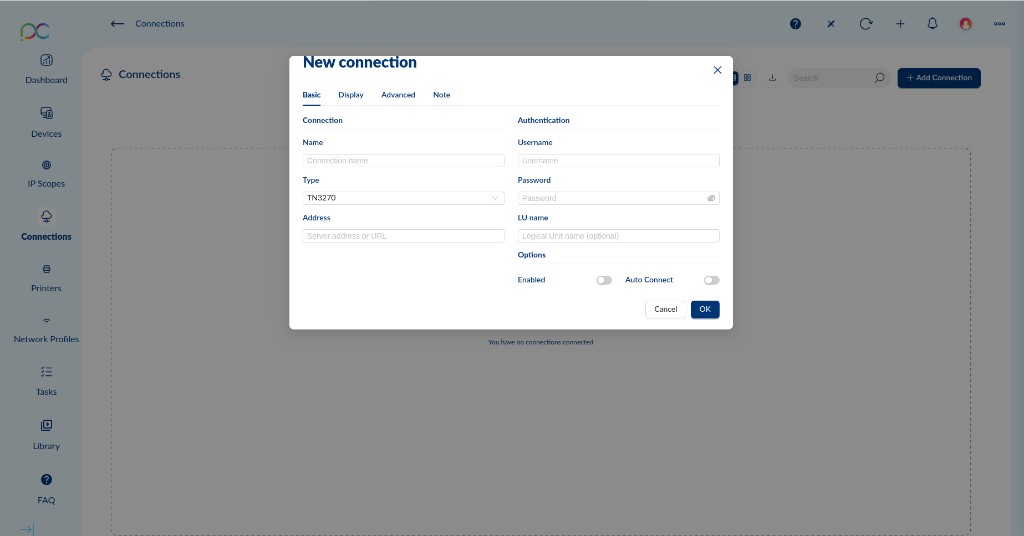
Connection
Connexion
Verbindung
Conexión
Ligação
Connessione
חיבור
| Field | Champ | Feld | Campo | Campo | Campo | שדה | Description | Description | Beschreibung | Descripción | Descrição | Descrizione | תיאור |
|---|---|---|---|---|---|---|---|---|---|---|---|---|---|
| Name | Display name for this TN3270 connection (e.g. "Mainframe PROD", "CICS Banking", "TSO Dev")Nom d'affichage de cette connexion TN3270 (ex. "Mainframe PROD", "CICS Banque", "TSO Dev")Anzeigename dieser TN3270-Verbindung (z.B. "Mainframe PROD", "CICS Banking")Nombre para mostrar (p. ej. "Mainframe PROD", "CICS Banca", "TSO Dev")Nome de exibição (ex. "Mainframe PROD", "CICS Banca", "TSO Dev")Nome visualizzato (es. "Mainframe PROD", "CICS Banking", "TSO Dev")שם תצוגה (לדוגמה "Mainframe PROD", "CICS Banking", "TSO Dev") | ||||||||||||
| Type | Protocol selector — set to TN3270 for this connection typeSélecteur de protocole — réglé sur TN3270Protokollauswahl — auf TN3270 eingestelltSelector de protocolo — establecido en TN3270Seletor de protocolo — definido como TN3270Selettore protocollo — impostato su TN3270בורר פרוטוקול — מוגדר ל-TN3270 | ||||||||||||
| Address | IP address or hostname of the IBM Mainframe TN3270 server (or its Communications Server / TN3270 gateway), e.g. mainframe.company.com, 10.0.1.100Adresse IP ou nom d'hôte du serveur TN3270 IBM Mainframe (ou de son Communications Server / passerelle TN3270), ex. mainframe.company.com, 10.0.1.100IP-Adresse oder Hostname des IBM Mainframe TN3270-Servers oder Communications Server-GatewaysDirección IP o nombre de host del servidor TN3270 IBM Mainframe o gateway Communications ServerEndereço IP ou nome do host do servidor TN3270 IBM Mainframe ou gateway Communications ServerIndirizzo IP o hostname del server TN3270 IBM Mainframe o gateway Communications Serverכתובת IP או שם מארח של שרת TN3270 IBM Mainframe או Communications Server gateway |
Authentication
Authentification
Authentifizierung
Autenticación
Autenticação
Autenticazione
אימות
| Field | Champ | Feld | Campo | Campo | Campo | שדה | Description | Description | Beschreibung | Descripción | Descrição | Descrizione | תיאור |
|---|---|---|---|---|---|---|---|---|---|---|---|---|---|
| Username | RACF / SAF user ID for authentication on the IBM Mainframe (e.g. IBMUSER, JSMITH). Leave blank to enter credentials at the Mainframe VTAM logon screen or CICS sign-on panel.Identifiant RACF / SAF pour l'authentification sur le IBM Mainframe (ex. IBMUSER, JSMITH). Laisser vide pour saisir les identifiants à l'écran de connexion VTAM ou au panneau CICS.RACF / SAF-Benutzer-ID für IBM Mainframe. Leer lassen für Eingabe am VTAM-Anmeldebildschirm oder CICS-Panel.ID de usuario RACF / SAF para IBM Mainframe. Dejar en blanco para introducir en la pantalla de inicio de sesión VTAM o panel CICS.ID de utilizador RACF / SAF para IBM Mainframe. Deixar em branco para introduzir no ecrã de login VTAM ou painel CICS.ID utente RACF / SAF per IBM Mainframe. Lasciare vuoto per inserire alla schermata di login VTAM o panel CICS.מזהה משתמש RACF / SAF עבור IBM Mainframe. השאר ריק להזנה בעמוד כניסה VTAM או CICS. |
||||||||||||
| Password | RACF / SAF password — stored encrypted. Leave blank for interactive entry. Note: IBM Mainframe RACF passwords can be case-sensitive depending on the RACF MIXEDCASE setting on the host.Mot de passe RACF / SAF — stocké chiffré. Laisser vide pour saisie interactive. Note : les mots de passe RACF IBM Mainframe peuvent être sensibles à la casse selon le paramètre RACF MIXEDCASE sur l'hôte.RACF / SAF-Passwort — verschlüsselt gespeichert. Leer lassen für interaktive Eingabe.Contraseña RACF / SAF — almacenada cifrada. Dejar en blanco para entrada interactiva.Senha RACF / SAF — armazenada encriptada. Deixar em branco para entrada interativa.Password RACF / SAF — memorizzata cifrata. Lasciare vuoto per inserimento interattivo.סיסמת RACF / SAF — מאוחסנת מוצפנת. השאר ריק להזנה אינטראקטיבית. | ||||||||||||
| LU name |
Optional. Requests a specific Logical Unit (LU) name from the IBM Mainframe TN3270 Server. LU names are SNA resource names assigned to terminal sessions on the Mainframe (e.g. LU001, CICSLUA, PRODLUP1).Use cases:
Cas d'usage :
|
Options
Options
Optionen
Opciones
Opções
Opzioni
אפשרויות
| Option | Option | Option | Opción | Opção | Opzione | אפשרות | Description | Description | Beschreibung | Descripción | Descrição | Descrizione | תיאור |
|---|---|---|---|---|---|---|---|---|---|---|---|---|---|
| Enabled | Toggle to enable/disable this connection.Activer/désactiver cette connexion.Verbindung aktivieren/deaktivieren.Habilitar/deshabilitar esta conexión.Ativar/desativar esta ligação.Attivare/disattivare questa connessione.הפעל/השבת חיבור זה. | ||||||||||||
| Auto Connect | Automatically launches this TN3270 session when the device boots or the user logs in. Ideal for dedicated Mainframe workstations where users should be presented directly with the IBM Mainframe VTAM or CICS logon screen.Lance automatiquement cette session TN3270 au démarrage ou à la connexion. Idéal pour les postes Mainframe dédiés où les utilisateurs doivent être présentés directement avec l'écran de connexion VTAM ou CICS IBM Mainframe.Startet automatisch beim Start oder Login. Ideal für dedizierte Mainframe-Workstations.Inicia automáticamente al arrancar o al iniciar sesión. Ideal para estaciones de trabajo Mainframe dedicadas.Inicia automaticamente ao arrancar ou ao iniciar sessão. Ideal para postos de trabalho Mainframe dedicados.Avvia automaticamente all'avvio o al login. Ideale per workstation Mainframe dedicate.מפעיל אוטומטית עם הפעלה או כניסה. אידיאלי לתחנות עבודה Mainframe ייעודיות. |
Tab — DisplayOnglet — DisplayReiter — DisplayPestaña — DisplaySeparador — DisplayScheda — Displayלשונית — Display
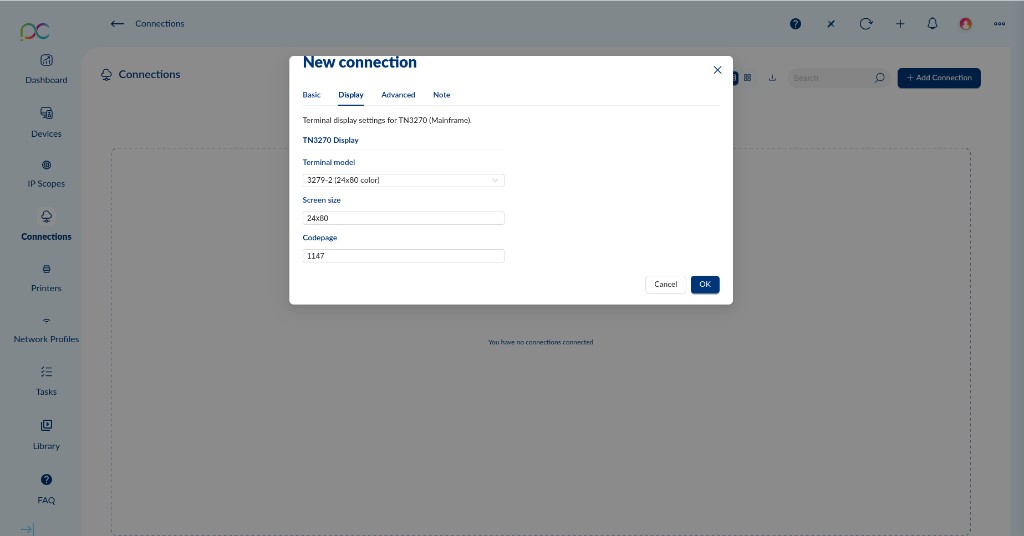
Note: The Display tab header reads "Terminal display settings for TN3270 (Mainframe)".
Remarque : L'en-tête de l'onglet Display indique « Terminal display settings for TN3270 (Mainframe) ».
Hinweis: Der Display-Reiter zeigt Terminalanzeigeeinstellungen für TN3270 (Mainframe).
Nota: La pestaña Display muestra ajustes de pantalla de terminal para TN3270 (Mainframe).
Nota: O separador Display mostra definições de exibição de terminal para TN3270 (Mainframe).
Nota: La scheda Display mostra le impostazioni di visualizzazione terminale per TN3270 (Mainframe).
הערה: לשונית Display מציגה הגדרות תצוגת טרמינל עבור TN3270 (Mainframe).
| Field | Champ | Feld | Campo | Campo | Campo | שדה | Description | Description | Beschreibung | Descripción | Descrição | Descrizione | תיאור |
|---|---|---|---|---|---|---|---|---|---|---|---|---|---|
| Terminal model |
Defines the IBM 3270 terminal model to emulate. Default: 3279-2 (24x80 color). This determines the display capabilities advertised to the Mainframe host during TN3270 negotiation. Common models:
Modèles courants :
|
||||||||||||
| Screen size | Sets the number of rows and columns for the 3270 terminal display. Default: 24x80. This should match the rows/columns implied by the selected terminal model (e.g. 24x80 for models -2/-3/-4, 27x132 for model -5). Some TN3270 servers allow overriding the screen size independently of the terminal model.Définit le nombre de lignes et de colonnes pour l'affichage du terminal 3270. Par défaut : 24x80. Doit correspondre aux lignes/colonnes implicites du modèle de terminal sélectionné.Legt Zeilen und Spalten fest. Standard: 24x80. Sollte dem Terminal-Modell entsprechen.Establece filas y columnas. Predeterminado: 24x80. Debe coincidir con el modelo de terminal.Define linhas e colunas. Padrão: 24x80. Deve corresponder ao modelo de terminal.Imposta righe e colonne. Predefinito: 24x80. Deve corrispondere al modello terminale.מגדיר שורות ועמודות. ברירת מחדל: 24x80. צריך להתאים לדגם הטרמינל. | ||||||||||||
| Codepage |
EBCDIC code page used to translate characters between the IBM Mainframe host and the thin client display. Must match the code page configured in the Mainframe TN3270 Server profile. Default: 1147 (France — Euro). Common code pages:
|
Tab — AdvancedOnglet — AdvancedReiter — AdvancedPestaña — AdvancedSeparador — AdvancedScheda — Advancedלשונית — Advanced
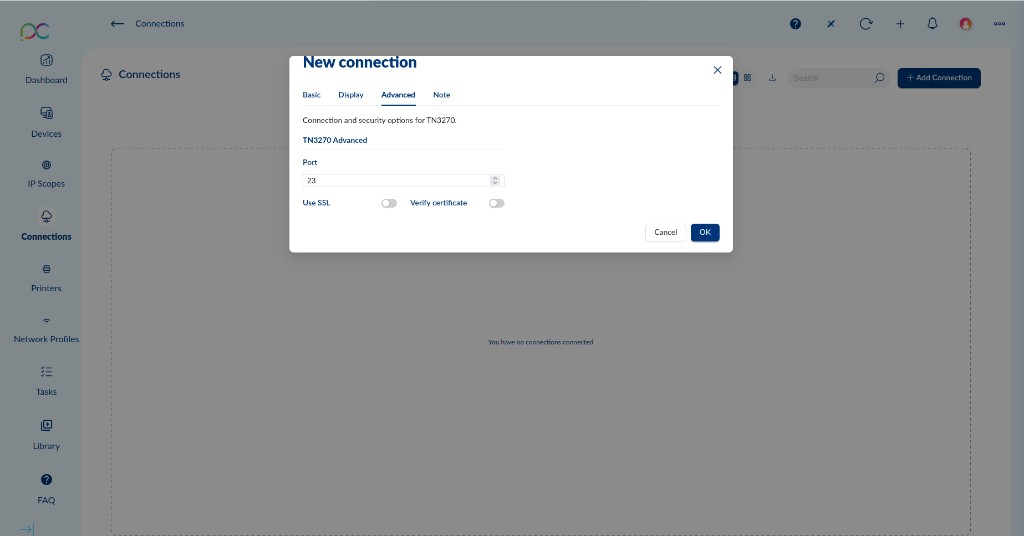
Note: The Advanced tab header reads "Connection and security options for TN3270".
Remarque : L'en-tête de l'onglet Advanced indique « Connection and security options for TN3270 ».
Hinweis: Verbindungs- und Sicherheitsoptionen für TN3270.
Nota: Opciones de conexión y seguridad para TN3270.
Nota: Opções de ligação e segurança para TN3270.
Nota: Opzioni di connessione e sicurezza per TN3270.
הערה: אפשרויות חיבור ואבטחה עבור TN3270.
| Field / Option | Champ / Option | Feld / Option | Campo / Opción | Campo / Opção | Campo / Opzione | שדה / אפשרות | Description | Description | Beschreibung | Descripción | Descrição | Descrizione | תיאור |
|---|---|---|---|---|---|---|---|---|---|---|---|---|---|
| Port | TCP port used for the TN3270 connection. Default: 23 (standard Telnet/TN3270). For TLS-encrypted connections, IBM Mainframe Communications Server typically uses port 992 — update this value when enabling Use SSL. Custom ports may be required if the connection passes through a firewall or a TN3270-to-SNA gateway.Port TCP utilisé pour la connexion TN3270. Par défaut : 23 (Telnet/TN3270 standard). Pour les connexions TLS, IBM Mainframe Communications Server utilise généralement le port 992 — mettre à jour cette valeur lors de l'activation de Use SSL.TCP-Port. Standard: 23. Bei TLS: IBM Mainframe Communications Server Standard-Port 992.Puerto TCP. Predeterminado: 23. Con TLS: IBM Mainframe Communications Server usa puerto 992.Porta TCP. Padrão: 23. Com TLS: IBM Mainframe Communications Server usa porta 992.Porta TCP. Predefinita: 23. Con TLS: IBM Mainframe Communications Server usa porta 992.יציאת TCP. ברירת מחדל: 23. עם TLS: IBM Mainframe Communications Server משתמש ביציאה 992. | ||||||||||||
| Use SSL | Encrypts the TN3270 session using SSL/TLS. Requires the IBM Mainframe Communications Server TN3270 Service to be configured for AT-TLS (Application Transparent TLS) or native TLS. Strongly recommended for any Mainframe access over WAN or the internet. When enabled, change Port to 992.Chiffre la session TN3270 via SSL/TLS. Nécessite la configuration du service TN3270 IBM Mainframe Communications Server pour AT-TLS ou TLS natif. Fortement recommandé pour tout accès Mainframe via WAN ou Internet. Lors de l'activation, modifier le Port à 992.Verschlüsselt die TN3270-Sitzung mit SSL/TLS. Erfordert AT-TLS oder natives TLS auf dem Mainframe. Bei WAN/Internet dringend empfohlen. Port auf 992 ändern.Cifra la sesión TN3270 con SSL/TLS. Requiere AT-TLS o TLS nativo en el Mainframe. Muy recomendado para WAN/internet. Cambiar Puerto a 992.Encripta a sessão TN3270 com SSL/TLS. Requer AT-TLS ou TLS nativo no Mainframe. Fortemente recomendado para WAN/internet. Alterar Porta para 992.Cifra la sessione TN3270 con SSL/TLS. Richiede AT-TLS o TLS nativo sul Mainframe. Fortemente consigliato per WAN/internet. Cambiare Porta in 992.מצפין את סשן TN3270 באמצעות SSL/TLS. דורש AT-TLS או TLS מקומי ב-Mainframe. מומלץ מאוד ל-WAN/אינטרנט. שנה יציאה ל-992. | ||||||||||||
| Verify certificate | When enabled (requires Use SSL), validates the Mainframe TN3270 server's SSL/TLS certificate against trusted certificate authorities in the thin client trust store. Recommended in production environments to prevent man-in-the-middle attacks. Disable only in test/lab environments where the Mainframe TN3270 service uses a self-signed certificate not present in the trust store.Lorsque activé (nécessite Use SSL), valide le certificat SSL/TLS du serveur TN3270 Mainframe. Recommandé en production pour prévenir les attaques man-in-the-middle. Désactiver uniquement en test/lab avec certificat auto-signé.Wenn aktiviert (erfordert Use SSL), validiert das SSL/TLS-Zertifikat des Mainframe TN3270-Servers. In der Produktion empfohlen. Nur in Test/Lab deaktivieren.Cuando está habilitado (requiere Use SSL), valida el certificado SSL/TLS del servidor TN3270 Mainframe. Recomendado en producción.Quando ativado (requer Use SSL), valida o certificado SSL/TLS do servidor TN3270 Mainframe. Recomendado em produção.Se abilitato (richiede Use SSL), valida il certificato SSL/TLS del server TN3270 Mainframe. Consigliato in produzione.כאשר מופעל (דורש Use SSL), מאמת את אישור SSL/TLS של שרת TN3270 Mainframe. מומלץ בייצור. |