Database Base de données Datenbank Base de datos Base de dados Database מסד נתונים
Overview Vue d'ensemble Übersicht Resumen Visão geral Panoramica סקירה כללית
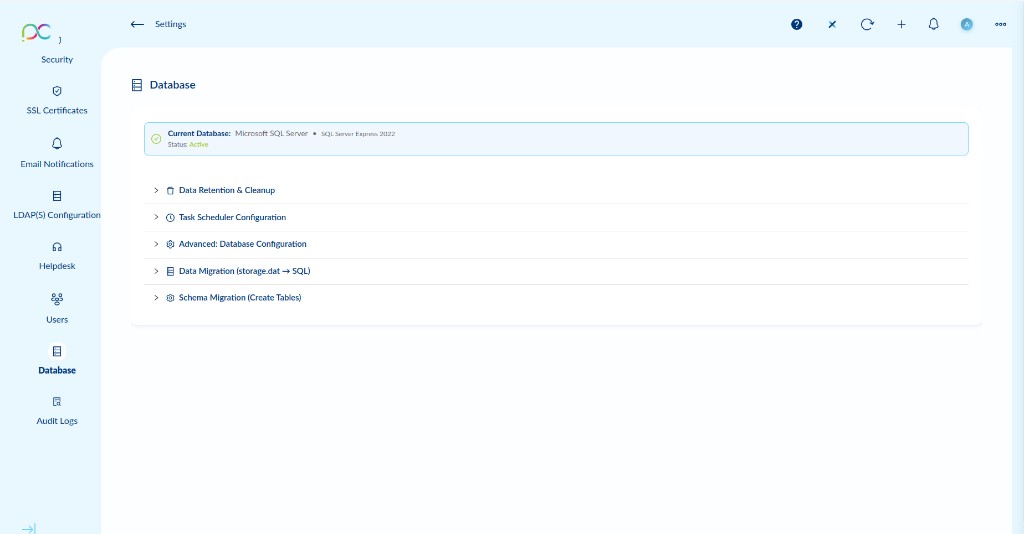
Access via Settings → Database. This page manages the Xcalibur server database configuration, including data housekeeping, the task scheduler engine, database type, and migration tools.
The status bar at the top shows the Current Database type and version (e.g. Microsoft SQL Server — SQL Server Express 2022) and its connection Status (Active).
The page contains five collapsible sections:
- Data Retention & Cleanup — Configure log and statistics retention periods and run immediate cleanups.
- Task Scheduler Configuration — Enable and configure the internal task execution engine.
- Advanced: Database Configuration — Switch database type or update the connection string.
- Data Migration (storage.dat → SQL) — Migrate legacy flat-file data to the SQL database.
- Schema Migration (Create Tables) — Create or update the database schema.
Accédez via Paramètres → Base de données. Gère la configuration de la base de données Xcalibur : rétention, planificateur, type de base, et outils de migration.
La barre de statut montre le type et la version de la base actuelle (ex. Microsoft SQL Server — SQL Server Express 2022) et son statut (Active).
La page contient cinq sections repliables : Data Retention & Cleanup, Task Scheduler Configuration, Advanced: Database Configuration, Data Migration (storage.dat → SQL), Schema Migration (Create Tables).
Einstellungen → Datenbank. Zeigt aktuellen DB-Typ (z.B. Microsoft SQL Server Express 2022) und Status (Aktiv). Fünf einklappbare Bereiche: Datenhaltung, Aufgabenplaner, Erweiterte Konfiguration, Datenmigration, Schemamigration.
Configuración → Base de datos. Muestra tipo de BD actual (p.ej. Microsoft SQL Server Express 2022) y estado (Activo). Cinco secciones plegables: Retención de datos, Planificador, Configuración avanzada, Migración de datos, Migración de esquema.
Definições → Base de dados. Mostra tipo de BD atual (ex. Microsoft SQL Server Express 2022) e estado (Ativo). Cinco secções recolhíveis: Retenção de dados, Agendador, Configuração avançada, Migração de dados, Migração de esquema.
Impostazioni → Database. Mostra tipo DB corrente (es. Microsoft SQL Server Express 2022) e stato (Attivo). Cinque sezioni comprimibili: Conservazione dati, Pianificatore, Configurazione avanzata, Migrazione dati, Migrazione schema.
הגדרות ← מסד נתונים. מציג סוג מסד נתונים נוכחי (למשל Microsoft SQL Server Express 2022) וסטטוס (פעיל). חמישה סעיפים מתקפלים: שמירת נתונים, מתזמן משימות, הגדרות מתקדמות, העברת נתונים, העברת סכמה.
Data Retention & Cleanup Rétention des données et nettoyage Datenhaltung & Bereinigung Retención de datos y limpieza Retenção de dados e limpeza Conservazione dati e pulizia שמירת נתונים וניקוי
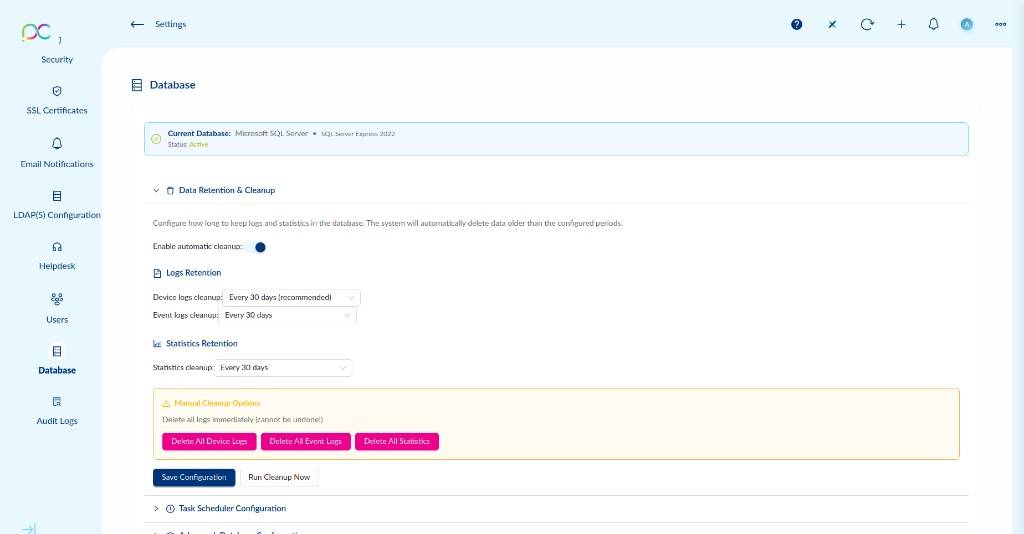
Configure how long Xcalibur keeps logs and statistics in the database. The system automatically deletes data older than the configured periods.
Automatic Cleanup
| Setting | Description | Default |
|---|---|---|
| Enable automatic cleanup | Toggle that activates the scheduled cleanup job. When enabled, the server periodically purges old logs and statistics according to the periods below. | On |
Logs Retention
| Setting | Description | Default |
|---|---|---|
| Device logs cleanup | How long to retain device activity logs (connections, disconnections, errors, status changes). | Every 30 days |
| Event logs cleanup | How long to retain server event logs (system events, task executions, alerts). | Every 30 days |
Statistics Retention
| Setting | Description | Default |
|---|---|---|
| Statistics cleanup | How long to retain aggregated usage statistics used for reports and dashboards. | Every 30 days |
Click Save Configuration to apply the retention settings. Click Run Cleanup Now to immediately trigger the cleanup job using the current settings without waiting for the scheduled run.
Manual Cleanup Options
- Delete All Device Logs — Permanently removes all device log entries from the database.
- Delete All Event Logs — Permanently removes all server event log entries.
- Delete All Statistics — Permanently removes all collected statistics and usage data.
Configurez la durée de conservation des journaux et statistiques. Le système supprime automatiquement les données plus anciennes que les périodes configurées.
| Paramètre | Description | Défaut |
|---|---|---|
| Enable automatic cleanup | Active la tâche de nettoyage planifiée. | Activé |
| Device logs cleanup | Durée de conservation des journaux d'activité des appareils. | Tous les 30 jours |
| Event logs cleanup | Durée de conservation des journaux d'événements serveur. | Tous les 30 jours |
| Statistics cleanup | Durée de conservation des statistiques agrégées. | Tous les 30 jours |
Cliquez sur Save Configuration pour appliquer, Run Cleanup Now pour déclencher immédiatement.
Datenhaltung: Enable automatic cleanup (Standard: Ein), Device logs cleanup (Standard: 30 Tage), Event logs cleanup (Standard: 30 Tage), Statistics cleanup (Standard: 30 Tage). Konfiguration speichern oder Bereinigung sofort starten. Manuelle Optionen (unwiderruflich): Alle Gerätelogs, Alle Ereignislogs oder Alle Statistiken löschen.
Retención: Enable automatic cleanup (predeterminado: activado), Device logs cleanup (predeterminado: 30 días), Event logs cleanup (30 días), Statistics cleanup (30 días). Guardar configuración o ejecutar limpieza ahora. Opciones manuales (irreversibles): Eliminar todos los logs de dispositivos, eventos o estadísticas.
Retenção: Enable automatic cleanup (padrão: ativado), Device logs cleanup (padrão: 30 dias), Event logs cleanup (30 dias), Statistics cleanup (30 dias). Guardar configuração ou executar limpeza agora. Opções manuais (irreversíveis): Eliminar todos os logs de dispositivos, eventos ou estatísticas.
Conservazione: Enable automatic cleanup (default: attivato), Device logs cleanup (default: 30 giorni), Event logs cleanup (30 giorni), Statistics cleanup (30 giorni). Salva configurazione o esegui pulizia ora. Opzioni manuali (irreversibili): Elimina tutti i log dispositivi, eventi o statistiche.
שמירת נתונים: Enable automatic cleanup (ברירת מחדל: מופעל), Device logs cleanup (ברירת מחדל: 30 יום), Event logs cleanup (30 יום), Statistics cleanup (30 יום). שמור תצורה או הפעל ניקוי עכשיו. אפשרויות ידניות (בלתי הפיכות): מחק את כל יומני המכשירים, האירועים או הסטטיסטיקות.
Task Scheduler Configuration Configuration du planificateur de tâches Aufgabenplaner-Konfiguration Configuración del planificador de tareas Configuração do agendador de tarefas Configurazione pianificatore attività הגדרות מתזמן משימות
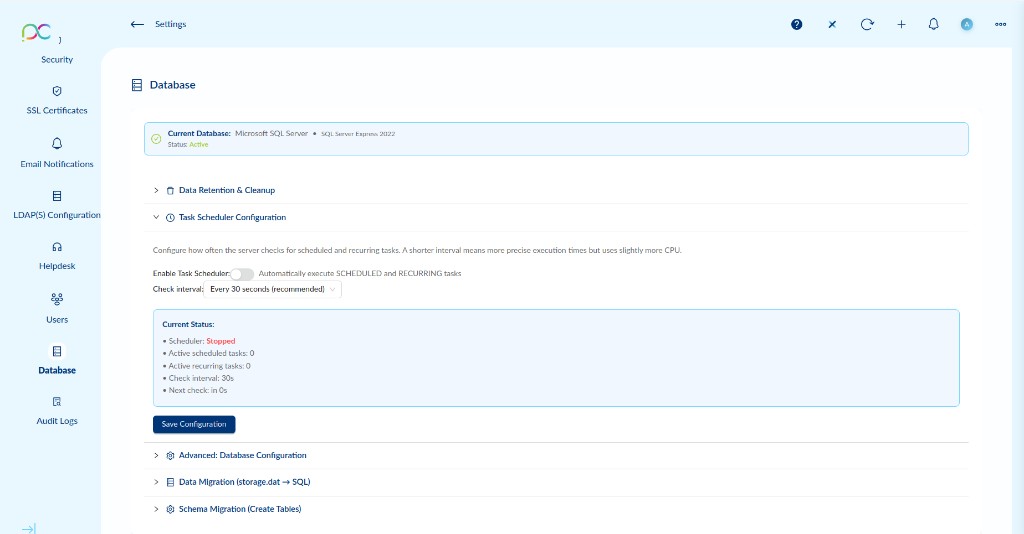
The Task Scheduler is the internal engine that automatically executes SCHEDULED and RECURRING tasks at their configured times. Configure how often the server polls for tasks to run.
| Setting | Description | Default |
|---|---|---|
| Enable Task Scheduler | Activates the background scheduler. When disabled, SCHEDULED and RECURRING tasks will not execute automatically — they must be triggered manually. | Off |
| Check interval | How often the server checks for tasks that are due to run. Lower values give more precise timing. | Every 30 seconds |
Current Status
The status panel shows the live state of the scheduler engine:
| Field | Description |
|---|---|
| Scheduler | Running or Stopped. Reflects whether the scheduler is actively polling. |
| Active scheduled tasks | Number of SCHEDULED tasks currently awaiting execution. |
| Active recurring tasks | Number of RECURRING tasks registered in the system. |
| Check interval | Currently applied polling interval (e.g. 30s). |
| Next check | Countdown to the next scheduler poll cycle. |
Click Save Configuration to apply changes. The scheduler will restart automatically if it was running.
Le planificateur de tâches est le moteur interne qui exécute automatiquement les tâches SCHEDULED et RECURRING.
| Paramètre | Description | Défaut |
|---|---|---|
| Enable Task Scheduler | Active le planificateur en arrière-plan. Désactivé = les tâches planifiées ne s'exécutent pas automatiquement. | Désactivé |
| Check interval | Fréquence de vérification des tâches à exécuter. Un intervalle plus court = plus précis mais légèrement plus de CPU. | Toutes les 30 s |
Le panneau de statut affiche : Scheduler (Running/Stopped), tâches scheduled actives, tâches récurrentes actives, intervalle de vérification, prochain contrôle.
Cliquez sur Save Configuration pour appliquer.
Aufgabenplaner: Enable Task Scheduler (Standard: Aus), Check interval (Standard: 30 Sekunden). Status-Panel: Scheduler Running/Stopped, aktive SCHEDULED-Aufgaben, aktive RECURRING-Aufgaben, Prüfintervall, nächste Prüfung. Konfiguration speichern zum Anwenden.
Planificador: Enable Task Scheduler (predeterminado: desactivado), Check interval (predeterminado: 30 segundos). Panel de estado: Scheduler Running/Stopped, tareas SCHEDULED activas, tareas RECURRING activas, intervalo, próxima verificación. Guardar configuración para aplicar.
Agendador: Enable Task Scheduler (padrão: desativado), Check interval (padrão: 30 segundos). Painel de estado: Scheduler Running/Stopped, tarefas SCHEDULED ativas, tarefas RECURRING ativas, intervalo, próxima verificação. Guardar configuração para aplicar.
Pianificatore: Enable Task Scheduler (default: disattivato), Check interval (default: 30 secondi). Pannello stato: Scheduler Running/Stopped, attività SCHEDULED attive, attività RECURRING attive, intervallo, prossima verifica. Salva configurazione per applicare.
מתזמן משימות: Enable Task Scheduler (ברירת מחדל: כבוי), Check interval (ברירת מחדל: 30 שניות). לוח סטטוס: Scheduler Running/Stopped, משימות SCHEDULED פעילות, משימות RECURRING פעילות, מרווח, בדיקה הבאה. שמור תצורה להחלה.
Advanced: Database Configuration Avancé : Configuration de la base de données Erweitert: Datenbankkonfiguration Avanzado: Configuración de base de datos Avançado: Configuração de base de dados Avanzato: Configurazione database מתקדם: הגדרות מסד נתונים
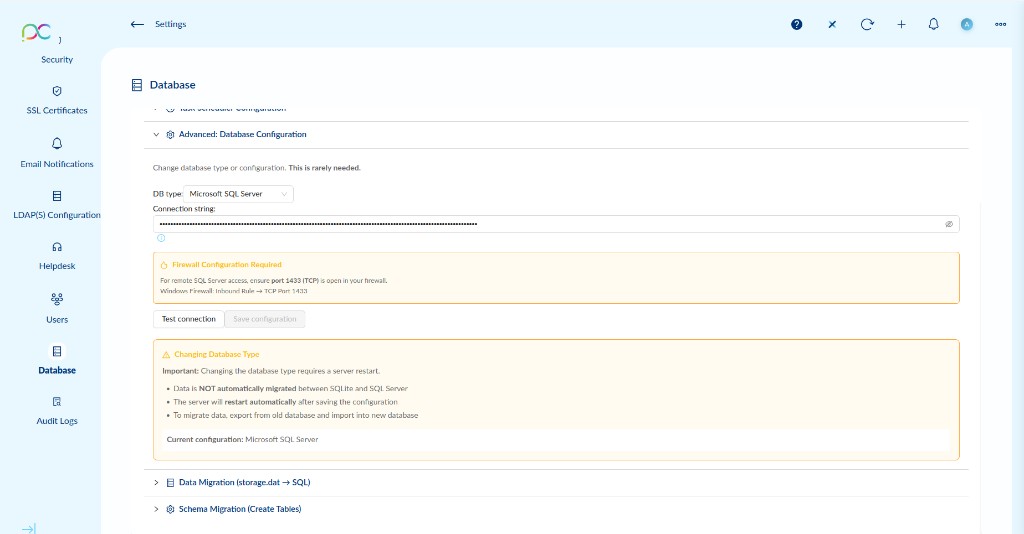
| Field | Description |
|---|---|
| DB type | Database engine used by Xcalibur. Options: Microsoft SQL Server or SQLite. SQL Server is recommended for production; SQLite is suitable for small/test deployments. |
| Connection string | The full database connection string. Masked by default for security. Updated automatically when switching DB types but can be customised for remote SQL Server instances. |
Click Test connection to verify the connection string is valid before saving. Click Save configuration to apply.
Firewall Configuration
For remote SQL Server access, ensure port 1433 (TCP) is open in your firewall.
Windows Firewall: create an Inbound Rule → TCP Port 1433.
Changing Database Type
- Data is NOT automatically migrated between SQLite and SQL Server.
- The server will restart automatically after saving the configuration.
- To migrate data, export from the old database and import into the new one using the Data Migration tool below.
| Champ | Description |
|---|---|
| DB type | Moteur de base de données : Microsoft SQL Server (recommandé en production) ou SQLite (petits déploiements/tests). |
| Connection string | Chaîne de connexion complète à la base de données. Masquée par défaut. Peut être personnalisée pour les instances SQL Server distantes. |
Cliquez sur Test connection pour vérifier avant de sauvegarder.
Changement de type de base : Nécessite un redémarrage serveur. Les données ne sont pas migrées automatiquement — utilisez l'outil Data Migration.
Erweiterte DB-Konfiguration (selten benötigt): DB-Typ (Microsoft SQL Server oder SQLite), Verbindungszeichenfolge (maskiert). Test connection prüfen, dann Konfiguration speichern. Firewall: Port 1433 (TCP) öffnen. Datenbanktyp ändern: Serverneustart erforderlich, Daten werden NICHT automatisch migriert.
Configuración avanzada de BD (raramente necesaria): Tipo de BD (Microsoft SQL Server o SQLite), cadena de conexión (enmascarada). Test connection, luego guardar. Firewall: abrir puerto 1433 (TCP). Cambiar tipo de BD: requiere reinicio del servidor, los datos NO se migran automáticamente.
Configuração avançada de BD (raramente necessária): Tipo de BD (Microsoft SQL Server ou SQLite), cadeia de ligação (mascarada). Test connection, depois guardar. Firewall: abrir porta 1433 (TCP). Mudar tipo de BD: requer reinício do servidor, os dados NÃO são migrados automaticamente.
Configurazione avanzata DB (raramente necessaria): Tipo DB (Microsoft SQL Server o SQLite), stringa di connessione (mascherata). Test connection, poi salva. Firewall: aprire porta 1433 (TCP). Cambiare tipo DB: richiede riavvio server, i dati NON vengono migrati automaticamente.
הגדרות מסד נתונים מתקדמות (לעיתים נדירות): סוג מסד נתונים (Microsoft SQL Server או SQLite), מחרוזת חיבור (מוסתרת). Test connection, אחר כך שמור. חומת אש: פתח פורט 1433 (TCP). שינוי סוג מסד נתונים: דורש הפעלה מחדש של השרת, הנתונים אינם מועברים אוטומטית.
Data Migration (storage.dat → SQL) Migration de données (storage.dat → SQL) Datenmigration (storage.dat → SQL) Migración de datos (storage.dat → SQL) Migração de dados (storage.dat → SQL) Migrazione dati (storage.dat → SQL) העברת נתונים (storage.dat ← SQL)
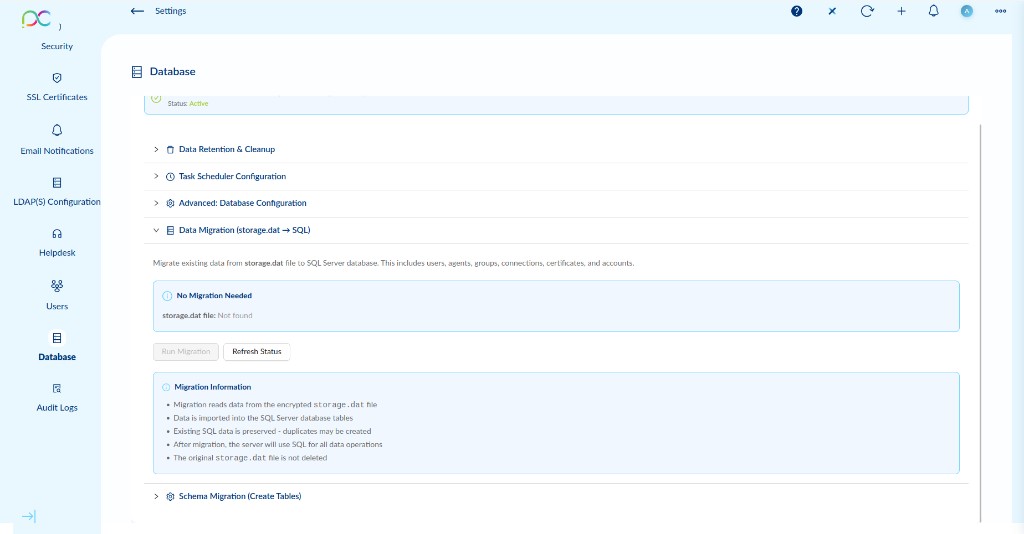
Use this tool to migrate existing data from the legacy storage.dat flat file to the SQL Server database. This is typically needed when upgrading from an older Xcalibur version that used file-based storage.
Data migrated includes: users, agents, groups, connections, certificates, and accounts.
Migration Status
| Status | Meaning |
|---|---|
| No Migration Needed | storage.dat file not found — no legacy data to import. The system is already using SQL exclusively. |
| Migration Available | storage.dat file detected — click Run Migration to import the data. |
| Migration Running | Import in progress — do not restart the server. |
Migration Information
- Migration reads data from the encrypted
storage.datfile. - Data is imported into the SQL Server database tables.
- Existing SQL data is preserved — duplicates may be created if records already exist.
- After migration, the server uses SQL for all data operations.
- The original
storage.datfile is not deleted after migration.
Click Refresh Status to re-check whether storage.dat is present. Click Run Migration to start the import.
Migrez les données existantes du fichier storage.dat hérité vers la base SQL Server. Utile lors de la mise à niveau depuis une ancienne version d'Xcalibur.
Données migrées : utilisateurs, agents, groupes, connexions, certificats, comptes.
| Statut | Signification |
|---|---|
| No Migration Needed | Fichier storage.dat introuvable — pas de données héritées à importer. |
| Migration Available | Fichier storage.dat détecté — cliquez Run Migration pour importer. |
- Migration depuis le fichier
storage.datchiffré. - Les données SQL existantes sont préservées — des doublons peuvent être créés.
- Le fichier
storage.datoriginal n'est pas supprimé.
Datenmigration (storage.dat → SQL): Importiert Benutzerdaten, Agenten, Gruppen, Verbindungen, Zertifikate und Konten aus der verschlüsselten storage.dat-Datei. Status: Keine Migration erforderlich (Datei nicht gefunden) oder Migration verfügbar. Bestehende SQL-Daten bleiben erhalten. storage.dat wird nach der Migration nicht gelöscht.
Migración de datos (storage.dat → SQL): Importa usuarios, agentes, grupos, conexiones, certificados y cuentas del archivo cifrado storage.dat. Estado: No se necesita migración (archivo no encontrado) o Migración disponible. Los datos SQL existentes se conservan. storage.dat no se elimina tras la migración.
Migração de dados (storage.dat → SQL): Importa utilizadores, agentes, grupos, ligações, certificados e contas do ficheiro encriptado storage.dat. Estado: Sem migração necessária (ficheiro não encontrado) ou Migração disponível. Os dados SQL existentes são preservados. storage.dat não é eliminado após a migração.
Migrazione dati (storage.dat → SQL): Importa utenti, agenti, gruppi, connessioni, certificati e account dal file storage.dat cifrato. Stato: Nessuna migrazione necessaria (file non trovato) o Migrazione disponibile. I dati SQL esistenti sono preservati. storage.dat non viene eliminato dopo la migrazione.
העברת נתונים (storage.dat ← SQL): מייבא משתמשים, סוכנים, קבוצות, חיבורים, אישורים וחשבונות מקובץ storage.dat מוצפן. סטטוס: אין צורך בהעברה (קובץ לא נמצא) או העברה זמינה. נתוני SQL קיימים נשמרים. storage.dat אינו נמחק לאחר ההעברה.
Schema Migration (Create Tables) Migration de schéma (création des tables) Schemamigration (Tabellen erstellen) Migración de esquema (crear tablas) Migração de esquema (criar tabelas) Migrazione schema (crea tabelle) העברת סכמה (יצירת טבלאות)
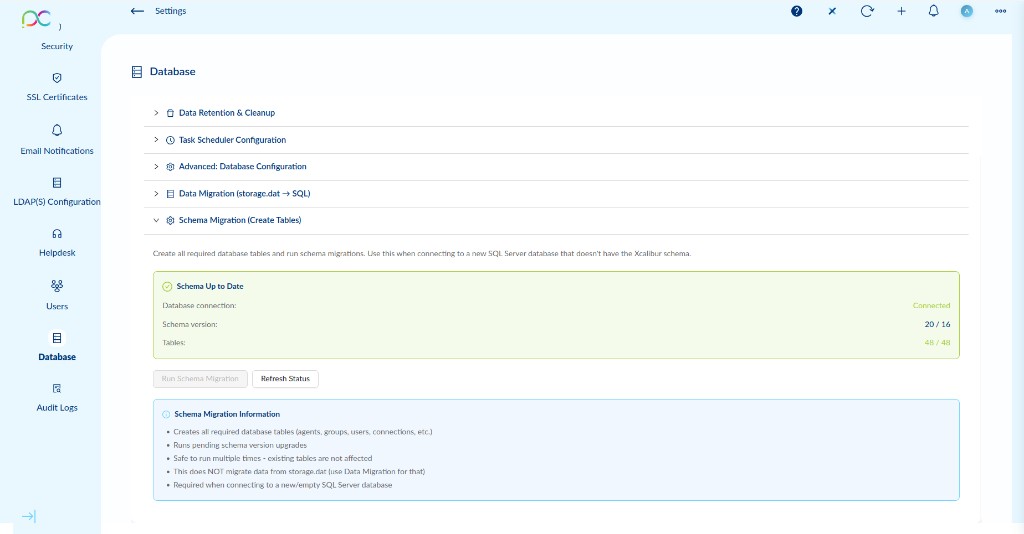
Use Schema Migration to create all required database tables and run pending schema version upgrades. Use this when connecting Xcalibur to a new or empty SQL Server database.
Schema Status
| Field | Description |
|---|---|
| Database connection | Connected — the server has a live connection to the configured database. |
| Schema version | Current / Latest schema version (e.g. 20 / 14). When these match, the schema is up to date. |
| Tables | Existing tables / Expected tables (e.g. 48 / 48). When equal, all tables are present. |
Schema Migration Information
- Creates all required database tables (agents, groups, users, connections, etc.).
- Runs any pending schema version upgrades.
- Safe to run multiple times — existing tables and data are not affected.
- This does NOT migrate data from
storage.dat— use Data Migration for that. - Required when connecting to a new or empty SQL Server database.
Click Run Schema Migration to create/update the schema. Click Refresh Status to re-check the current state.
Utilisez la migration de schéma pour créer toutes les tables requises et appliquer les mises à niveau de version de schéma en attente. À utiliser lors de la connexion à une nouvelle base SQL Server vide.
| Champ | Description |
|---|---|
| Database connection | Connected — connexion active à la base configurée. |
| Schema version | Version actuelle / dernière version (ex. 20 / 14). Identiques = schéma à jour. |
| Tables | Tables existantes / attendues (ex. 48 / 48). Identiques = toutes les tables présentes. |
- Crée toutes les tables requises (agents, groupes, utilisateurs, connexions, etc.).
- Applique les mises à niveau de schéma en attente.
- Sûr à exécuter plusieurs fois — les tables et données existantes ne sont pas affectées.
- N'importe pas les données de
storage.dat— utilisez Data Migration pour cela.
Schemamigration: Erstellt alle erforderlichen Datenbanktabellen und führt ausstehende Schema-Versions-Upgrades durch. Status: Datenbankverbindung (Connected), Schema-Version (aktuell/neueste), Tabellen (vorhanden/erwartet). Sicher mehrfach ausführbar – bestehende Daten bleiben unberührt. Migriert KEINE Daten aus storage.dat.
Migración de esquema: Crea todas las tablas necesarias y ejecuta actualizaciones de versión de esquema pendientes. Estado: conexión BD (Connected), versión de esquema (actual/última), tablas (existentes/esperadas). Seguro para ejecutar varias veces – datos existentes no se ven afectados. NO migra datos de storage.dat.
Migração de esquema: Cria todas as tabelas necessárias e executa atualizações de versão de esquema pendentes. Estado: ligação BD (Connected), versão de esquema (atual/última), tabelas (existentes/esperadas). Seguro para executar várias vezes – dados existentes não são afetados. NÃO migra dados de storage.dat.
Migrazione schema: Crea tutte le tabelle necessarie ed esegue aggiornamenti di versione schema in attesa. Stato: connessione DB (Connected), versione schema (corrente/ultima), tabelle (esistenti/previste). Sicuro da eseguire più volte – i dati esistenti non vengono modificati. NON migra dati da storage.dat.
העברת סכמה: יוצרת את כל הטבלאות הנדרשות ומריצה שדרוגי גרסת סכמה ממתינים. סטטוס: חיבור מסד נתונים (Connected), גרסת סכמה (נוכחית/אחרונה), טבלאות (קיימות/צפויות). בטוח להפעלה מרובה – נתונים קיימים לא מושפעים. אינה מעבירה נתונים מ-storage.dat.