GeneralGénéralAllgemeinGeneralGeralGeneraleכללי
General Server Configuration Configuration Générale du Serveur Allgemeine Serverkonfiguration Configuración General del Servidor Configuração Geral do Servidor Configurazione Generale del Server הגדרות כלליות של השרת
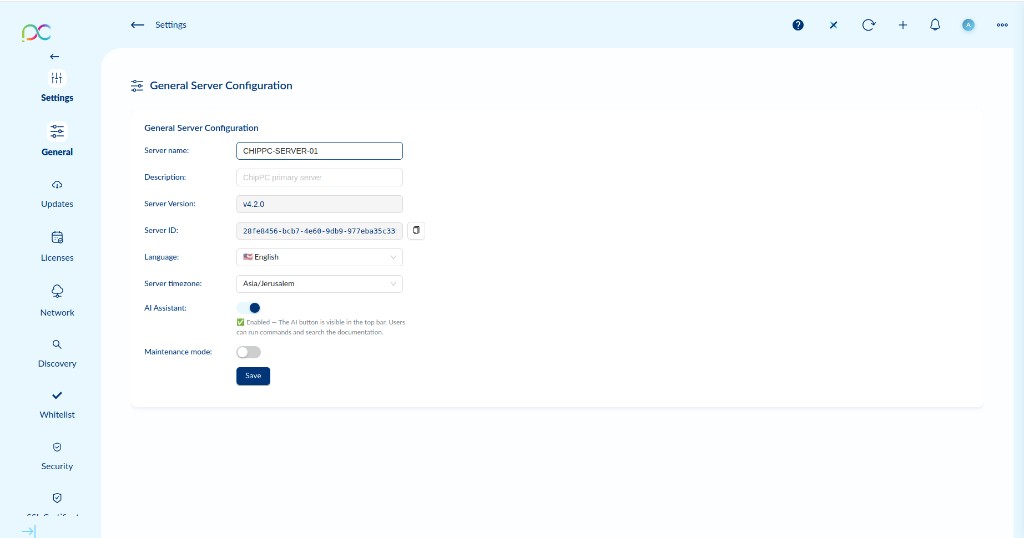
Access via Settings → General. Controls the core identity and behavior of the Xcalibur server.
| Field | Description |
|---|---|
| Server name | Friendly display name for this Xcalibur server instance (e.g. CHIPPC-SERVER-01). Shown in the UI header and agent registrations. |
| Description | Optional free-text description of the server. |
| Server Version | Read-only — installed Xcalibur server version (e.g. v4.2.0). |
| Server ID | Read-only UUID for this server instance. Used in licensing and agent communication. Copy button available. |
| Language | Default display language for the admin interface. |
| Server timezone | Timezone for all scheduled tasks, audit log timestamps, and reports. |
| AI Assistant | Enable/disable the ChipPC AI Assistant button in the top bar. |
| Maintenance mode | When enabled, a banner is shown to users and non-admin connections may be restricted. |
Click Save to apply changes.
Accédez via Paramètres → Général. Contrôle l'identité et le comportement principal du serveur Xcalibur.
| Champ | Description |
|---|---|
| Server name | Nom d'affichage de cette instance du serveur (ex. CHIPPC-SERVER-01). |
| Description | Description libre optionnelle du serveur. |
| Server Version | Lecture seule — version installée (ex. v4.2.0). |
| Server ID | UUID en lecture seule de cette instance. Bouton de copie disponible. |
| Language | Langue d'affichage par défaut de l'interface admin. |
| Server timezone | Fuseau horaire pour les tâches planifiées, les horodatages d'audit et les rapports. |
| AI Assistant | Activer/désactiver le bouton Assistant IA dans la barre supérieure. |
| Maintenance mode | Quand activé, une bannière est affichée et les connexions non-admin peuvent être restreintes. |
Cliquez sur Save pour appliquer.
Einstellungen → Allgemein: Servername, Beschreibung, Version (schreibgeschützt), Server-ID (schreibgeschützt), Sprache, Zeitzone, KI-Assistent, Wartungsmodus. Save klicken zum Speichern.
Configuración → General: Nombre del servidor, descripción, versión (solo lectura), ID del servidor (solo lectura), idioma, zona horaria, Asistente IA, modo mantenimiento. Clic en Save para aplicar.
Definições → Geral: Nome do servidor, descrição, versão (só leitura), ID do servidor (só leitura), idioma, fuso horário, Assistente IA, modo manutenção. Clique em Save para aplicar.
Impostazioni → Generale: Nome server, descrizione, versione (solo lettura), ID server (solo lettura), lingua, fuso orario, Assistente IA, modalità manutenzione. Cliccare Save per applicare.
הגדרות ← כללי: שם שרת, תיאור, גרסה (קריאה בלבד), מזהה שרת (קריאה בלבד), שפה, אזור זמן, עוזר AI, מצב תחזוקה. לחץ Save לשמירה.
ChipPC AI Assistant Assistant IA ChipPC ChipPC KI-Assistent Asistente IA ChipPC Assistente IA ChipPC Assistente IA ChipPC עוזר AI של ChipPC
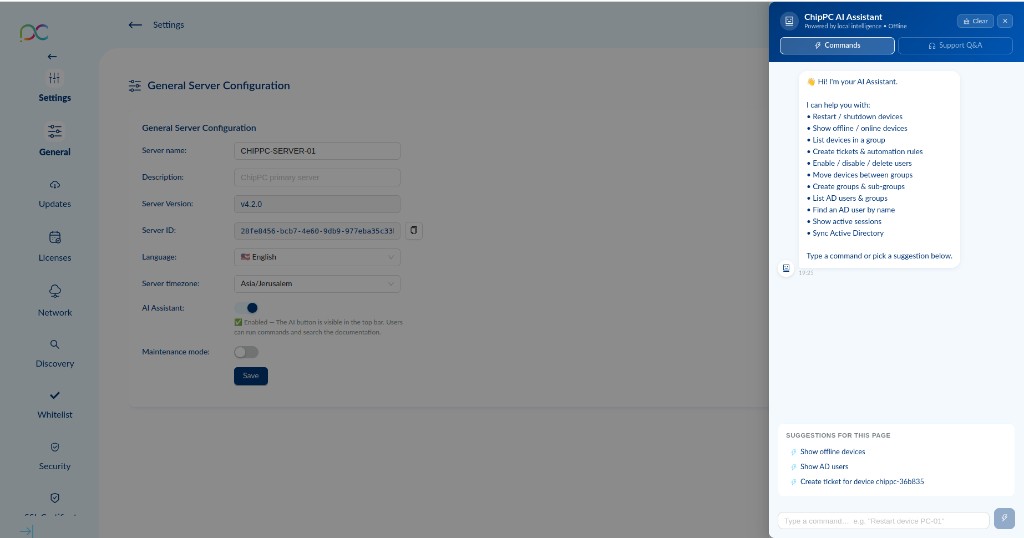
The ChipPC AI Assistant is a context-aware assistant integrated into the Xcalibur admin interface. Enabled via Settings → General → AI Assistant, it opens from the top bar.
Two tabs: Commands (execute actions via natural language) and Support Q&A (documentation questions).
Available Commands
| Command | What it does |
|---|---|
| Restart / shutdown devices | Send restart or shutdown to one or more thin clients |
| Show offline / online devices | List currently offline or online devices |
| List devices in a group | Display all devices in a specified group |
| Create tickets & automation rules | Create helpdesk tickets or automation rules |
| Enable / disable / delete users | Manage admin or AD user accounts |
| Move devices between groups | Reassign devices to a different group |
| Create groups & sub-groups | Create new device groups or nested sub-groups |
| List AD users & groups | Show synchronized Active Directory users and groups |
| Find an AD user by name | Search for a specific AD user |
| Show active sessions | Display currently active user sessions |
| Sync Active Directory | Trigger an immediate AD synchronization |
Page-Aware Suggestions
The assistant shows Suggestions for this page at the bottom — context-sensitive shortcuts based on the page you are viewing. Click any suggestion to pre-fill and run it instantly.
L'Assistant IA ChipPC s'active via Paramètres → Général → AI Assistant et s'ouvre depuis la barre supérieure.
Deux onglets : Commands (exécuter des actions) et Support Q&A (questions documentation).
Commandes disponibles
| Commande | Action |
|---|---|
| Restart / shutdown devices | Redémarrer ou éteindre des terminaux |
| Show offline / online devices | Lister les appareils hors/en ligne |
| List devices in a group | Afficher les appareils d'un groupe |
| Create tickets & automation rules | Créer des tickets ou règles d'automatisation |
| Enable / disable / delete users | Gérer les comptes utilisateurs |
| Move devices between groups | Réaffecter des appareils |
| Create groups & sub-groups | Créer des groupes d'appareils |
| List AD users & groups | Lister les utilisateurs/groupes AD |
| Find an AD user by name | Rechercher un utilisateur AD |
| Show active sessions | Sessions utilisateurs actives |
| Sync Active Directory | Synchronisation AD immédiate |
ChipPC KI-Assistent — aktiviert über Einstellungen → Allgemein. Zwei Tabs: Commands (Befehle), Support Q&A (Dokumentation). Läuft vollständig lokal auf dem Server.
Asistente IA ChipPC — activado en Configuración → General. Dos pestañas: Commands (acciones), Support Q&A (documentación). Funciona localmente en el servidor.
Assistente IA ChipPC — ativado em Definições → Geral. Dois separadores: Commands (ações), Support Q&A (documentação). Funciona localmente no servidor.
Assistente IA ChipPC — abilitato in Impostazioni → Generale. Due schede: Commands (azioni), Support Q&A (documentazione). Funziona localmente sul server.
עוזר AI של ChipPC — מופעל דרך הגדרות ← כללי. שתי לשוניות: Commands (פקודות), Support Q&A (תיעוד). פועל מקומית על השרת.