Helpdesk Helpdesk Helpdesk Helpdesk Helpdesk Helpdesk תמיכה
Chat Settings Paramètres du chat Chat-Einstellungen Configuración de chat Definições de chat Impostazioni chat הגדרות צ'אט
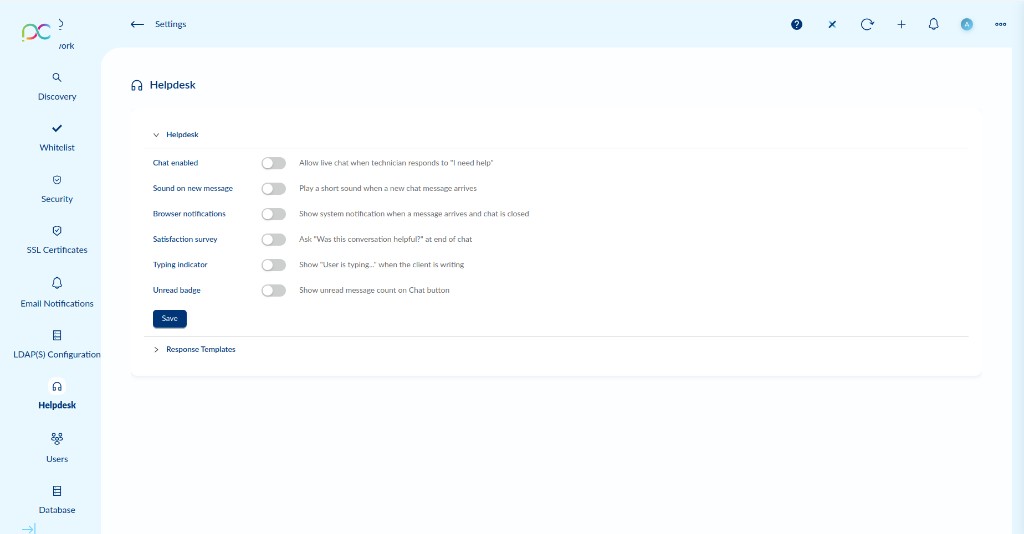
Access via Settings → Helpdesk. The Helpdesk module enables a live chat channel between administrators (technicians) and end users. When a user clicks "I need help" on their device and a technician responds, a chat session opens.
| Setting | Description | Default |
|---|---|---|
| Chat enabled | Allow live chat when a technician responds to a user's "I need help" request. Disabling this prevents chat sessions from starting. | Off |
| Sound on new message | Play a short audio alert in the admin interface when a new chat message arrives from a user. | Off |
| Browser notifications | Show a system (browser) notification when a new message arrives and the chat window is closed or minimized. Requires browser notification permission. | Off |
| Satisfaction survey | Automatically ask the user "Was this conversation helpful?" at the end of a chat session. Helps measure Helpdesk quality. | Off |
| Typing indicator | Show a "User is typing…" indicator in the chat when the client is composing a message. | Off |
| Unread badge | Display a count of unread messages on the Chat button in the admin interface, so technicians can see pending messages at a glance. | Off |
Click Save to apply changes.
Accédez via Paramètres → Helpdesk. Le module Helpdesk active un canal de chat en direct entre les administrateurs (techniciens) et les utilisateurs finaux.
| Paramètre | Description | Défaut |
|---|---|---|
| Chat enabled | Autorise le chat en direct lorsqu'un technicien répond à une demande "I need help" d'un utilisateur. | Désactivé |
| Sound on new message | Joue une alerte sonore dans l'interface admin quand un nouveau message de chat arrive. | Désactivé |
| Browser notifications | Affiche une notification système quand un nouveau message arrive et que le chat est fermé ou minimisé. | Désactivé |
| Satisfaction survey | Demande automatiquement à l'utilisateur "Cette conversation était-elle utile ?" à la fin d'une session de chat. | Désactivé |
| Typing indicator | Affiche "L'utilisateur est en train d'écrire…" dans le chat quand le client compose un message. | Désactivé |
| Unread badge | Affiche le nombre de messages non lus sur le bouton Chat pour que les techniciens voient les messages en attente. | Désactivé |
Cliquez sur Save pour appliquer les modifications.
Einstellungen → Helpdesk. Live-Chat-Kanal zwischen Technikern und Endbenutzern. Einstellungen: Chat aktiviert, Ton bei neuer Nachricht, Browser-Benachrichtigungen, Zufriedenheitsumfrage, Tipp-Indikator, Ungelesen-Badge. Speichern zum Anwenden.
Configuración → Helpdesk. Canal de chat en vivo entre técnicos y usuarios finales. Configuraciones: chat habilitado, sonido en nuevo mensaje, notificaciones del navegador, encuesta de satisfacción, indicador de escritura, badge de no leídos. Guardar para aplicar.
Definições → Helpdesk. Canal de chat ao vivo entre técnicos e utilizadores finais. Configurações: chat ativado, som em nova mensagem, notificações do navegador, questionário de satisfação, indicador de digitação, badge de não lidos. Guardar para aplicar.
Impostazioni → Helpdesk. Canale chat dal vivo tra tecnici e utenti finali. Impostazioni: chat abilitata, suono per nuovo messaggio, notifiche browser, sondaggio soddisfazione, indicatore di digitazione, badge non letti. Salvare per applicare.
הגדרות ← Helpdesk. ערוץ צ'אט חי בין טכנאים למשתמשי קצה. הגדרות: צ'אט מופעל, צליל בהודעה חדשה, התראות דפדפן, סקר שביעות רצון, מחוון הקלדה, תג הודעות שלא נקראו. שמור להחלת שינויים.
Response Templates Modèles de réponse Antwortvorlagen Plantillas de respuesta Modelos de resposta Modelli di risposta תבניות תגובה
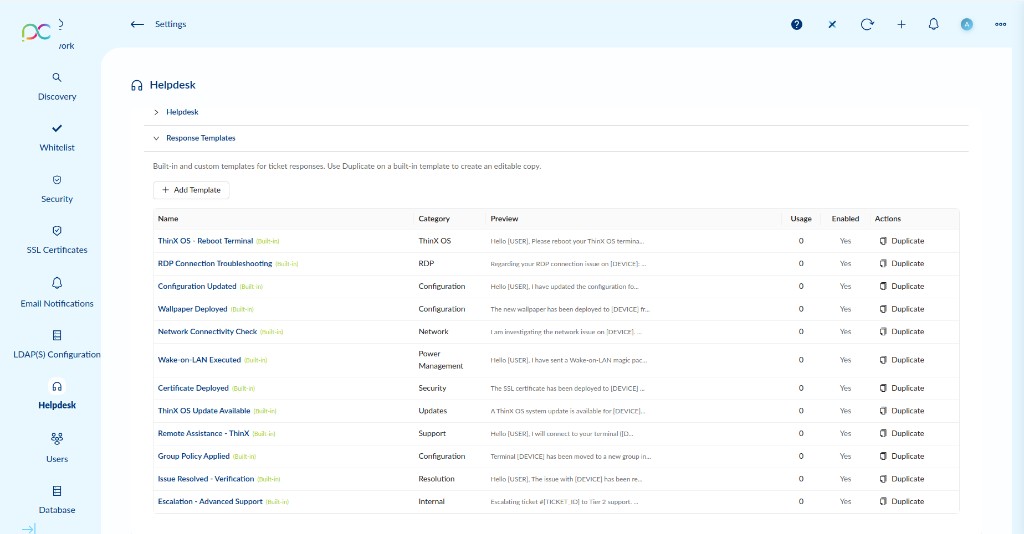
Response Templates are pre-written messages that technicians can insert into chat or ticket responses with a single click. They save time and ensure consistent, professional communication.
Template Table Columns
| Column | Description |
|---|---|
| Name | Template name. Built-in templates show a Built-in badge. |
| Category | Classification of the template (e.g. ThinX OS, RDP, Configuration, Network, Security, Updates, Support, Resolution, Internal). |
| Preview | A short excerpt of the template body. Variables like [USER] and [DEVICE] are replaced at send time. |
| Usage | Number of times this template has been used across all tickets. |
| Enabled | Whether this template is available for selection when composing a ticket response. |
| Actions | Duplicate — creates an editable copy of the template. |
Built-in Templates
| Template | Category | Use case |
|---|---|---|
| ThinX OS - Reboot Terminal | ThinX OS | Instructs the user to reboot their ThinX OS terminal. |
| RDP Connection Troubleshooting | RDP | Addresses an RDP connection issue on a specific device. |
| Configuration Updated | Configuration | Notifies the user that their configuration has been updated. |
| Wallpaper Deployed | Configuration | Confirms that a new wallpaper has been deployed to the device. |
| Network Connectivity Check | Network | Informs the user that a network issue is being investigated. |
| Wake-on-LAN Executed | Power Management | Confirms that a Wake-on-LAN magic packet was sent to the device. |
| Certificate Deployed | Security | Confirms that an SSL certificate has been deployed to the device. |
| ThinX OS Update Available | Updates | Notifies the user that a ThinX OS system update is available. |
| Remote Assistance - ThinX | Support | Informs the user that a technician will connect remotely. |
| Group Policy Applied | Configuration | Confirms that the terminal has been moved to a new group. |
| Issue Resolved - Verification | Resolution | Requests user confirmation that the reported issue is resolved. |
| Escalation - Advanced Support | Internal | Escalates the ticket to tier 2 support. |
Adding a Custom Template
Click + Add Template to create a new response template from scratch. Custom templates can be fully edited and deleted.
Use variables in template bodies to personalize responses automatically:
| Variable | Replaced with |
|---|---|
[USER] | The display name of the user who submitted the ticket. |
[DEVICE] | The name or ID of the device associated with the ticket. |
[TICKET_ID] | The unique identifier of the helpdesk ticket. |
Les modèles de réponse sont des messages pré-écrits que les techniciens peuvent insérer dans les réponses de chat ou de ticket en un seul clic.
Colonnes du tableau des modèles
| Colonne | Description |
|---|---|
| Name | Nom du modèle. Les modèles intégrés affichent un badge Built-in. |
| Category | Classification du modèle (ThinX OS, RDP, Configuration, Réseau, Sécurité, Mises à jour, Support, Résolution, Interne). |
| Preview | Extrait du corps du modèle. Les variables [USER], [DEVICE], [TICKET_ID] sont remplacées à l'envoi. |
| Usage | Nombre d'utilisations de ce modèle dans tous les tickets. |
| Enabled | Indique si ce modèle est disponible lors de la composition d'une réponse de ticket. |
| Actions | Duplicate — crée une copie modifiable du modèle. |
Ajouter un modèle personnalisé
Cliquez sur + Add Template pour créer un nouveau modèle. Variables disponibles : [USER], [DEVICE], [TICKET_ID].
Antwortvorlagen — vorgefertigte Nachrichten für Techniker. Integrierte Vorlagen (Built-in) können nicht bearbeitet werden — Duplicate verwenden, um eine bearbeitbare Kopie zu erstellen. + Add Template für neue benutzerdefinierte Vorlagen. Variablen: [USER], [DEVICE], [TICKET_ID].
Plantillas de respuesta — mensajes predefinidos para técnicos. Las plantillas integradas (Built-in) no se pueden editar — usar Duplicate para crear una copia editable. + Add Template para nuevas plantillas personalizadas. Variables: [USER], [DEVICE], [TICKET_ID].
Modelos de resposta — mensagens pré-escritas para técnicos. Modelos integrados (Built-in) não podem ser editados — usar Duplicate para criar uma cópia editável. + Add Template para novos modelos personalizados. Variáveis: [USER], [DEVICE], [TICKET_ID].
Modelli di risposta — messaggi predefiniti per i tecnici. I modelli integrati (Built-in) non possono essere modificati — usare Duplicate per creare una copia modificabile. + Add Template per nuovi modelli personalizzati. Variabili: [USER], [DEVICE], [TICKET_ID].
תבניות תגובה — הודעות מוכנות מראש לטכנאים. לא ניתן לערוך תבניות מובנות (Built-in) — השתמש ב-Duplicate ליצירת עותק ניתן לעריכה. + Add Template לתבניות מותאמות אישית. משתנים: [USER], [DEVICE], [TICKET_ID].